
Uploading a large batch of images to cloud storage is relatively straightforward. The more difficult part begins afterward: processing every image asynchronously while keeping the system scalable and the API responsive.
Imagine a mobile application that allows a user to upload hundreds of images in a single batch. Each image may need to be resized, compressed, analysed, or transformed before the batch can be considered complete.
Processing all of that work inside the original HTTP request would keep the connection open for too long, consume API resources, and make the system difficult to scale.
This is a classic use case for an event-driven backend architecture.
High-level architecture
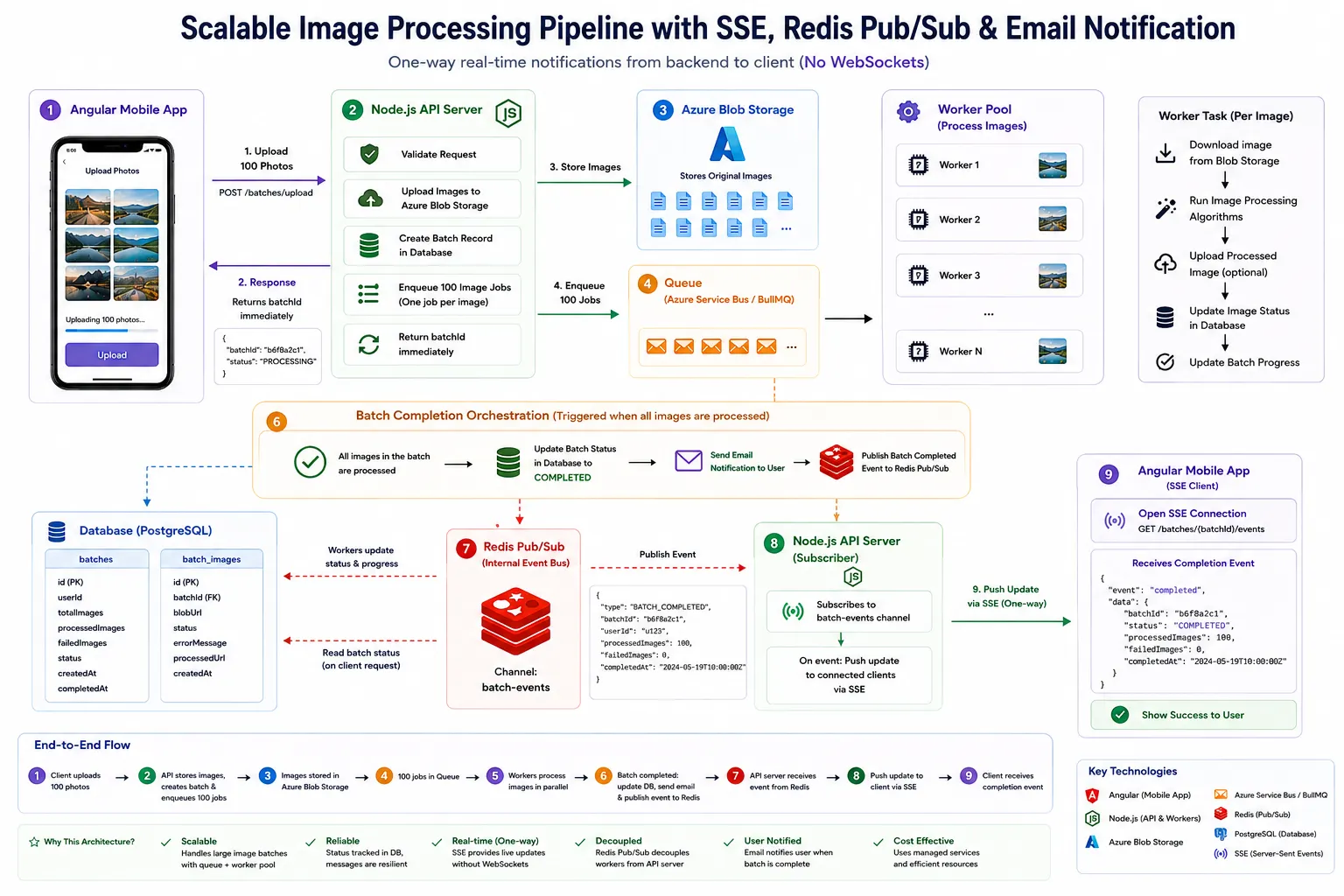
Assume an Angular mobile application uploads a batch of images to a Node.js backend.
The backend:
- Validates the request.
- Uploads the original files to blob storage.
- Creates a batch record in the database.
- Creates one image record for each uploaded file.
- Enqueues one processing job per image.
- Returns the batch ID immediately.
Angular client
      ↓
Node.js API → Blob storage
      ↓
Batch and image records
      ↓
Queue → Worker pool
The API does not wait for the images to be processed. It accepts the batch, records the work that needs to happen, and delegates that work to background workers through a queue such as BullMQ or Azure Service Bus.
This keeps the API responsive while allowing image processing to scale independently through a worker pool.
Processing images in the background
Each queued job represents one image.
A worker independently:
- Downloads the image from blob storage.
- Runs the required image-processing algorithms.
- Uploads the processed image when necessary.
- Updates the image status in the database.
- Updates the progress of the parent batch.
Sharp can handle operations such as resizing, compression, and format conversion. More CPU-intensive algorithms can be isolated using Worker Threads so they do not block the worker process's main event loop.
Because each image is processed as an independent job, additional workers can be added when the queue grows.
Image job → Worker → Process image → Update image status → Update batch progressCompleting the batch
When the final image has been processed, the system enters a completion-orchestration phase.
At this point:
- The batch is marked as
COMPLETED. - An email notification is queued or sent to the user.
- A
BATCH_COMPLETEDevent is published through an internal Pub/Sub channel.
All image jobs completed
          ↓
Mark batch as COMPLETED
          ↓
Send email + Publish BATCH_COMPLETED
The database remains the source of truth for the batch status. The Pub/Sub event is used to distribute the completion signal to interested application instances.
From Redis Pub/Sub to SSE
Redis Pub/Sub decouples the background workers from the API server.
The workers do not need to know which API instance holds the user's open connection. They simply publish an event to a batch-specific channel:
Worker
  ↓ BATCH_COMPLETED
Redis Pub/Sub
  ↓
Node.js API subscriber
  ↓
Connected client through SSE
The Node.js API subscribes to the internal event and forwards the update to the browser through Server-Sent Events, commonly called SSE.
This separates two responsibilities:
- Redis Pub/Sub distributes events inside the backend.
- SSE delivers one-way real-time updates from the API to the frontend.
Why use SSE?
The frontend needs to know when a long-running batch has completed. There are several possible approaches.
| Approach | How it works | Suitability |
|---|---|---|
| Polling | The frontend repeatedly requests the latest batch status. | Simple, but creates unnecessary requests and introduces a delay between checks. |
| Webhook | The backend sends an HTTP request to another registered endpoint. | Useful for backend-to-backend communication, but cannot directly notify a browser client. |
| WebSocket | The client and server maintain a two-way connection. | Powerful, but unnecessary when updates only travel from the server to the client. |
| SSE | The client opens a persistent HTTP connection through which the server sends events. | A strong fit for lightweight, one-way progress and completion updates. |
SSE fits this scenario because communication only needs to flow in one direction:
Server → ClientThe Angular client does not need to send messages through the same connection. It only needs to receive progress or completion events.
SSE also uses normal HTTP semantics and has native browser support through the EventSource API.
Minimal Node.js SSE endpoint
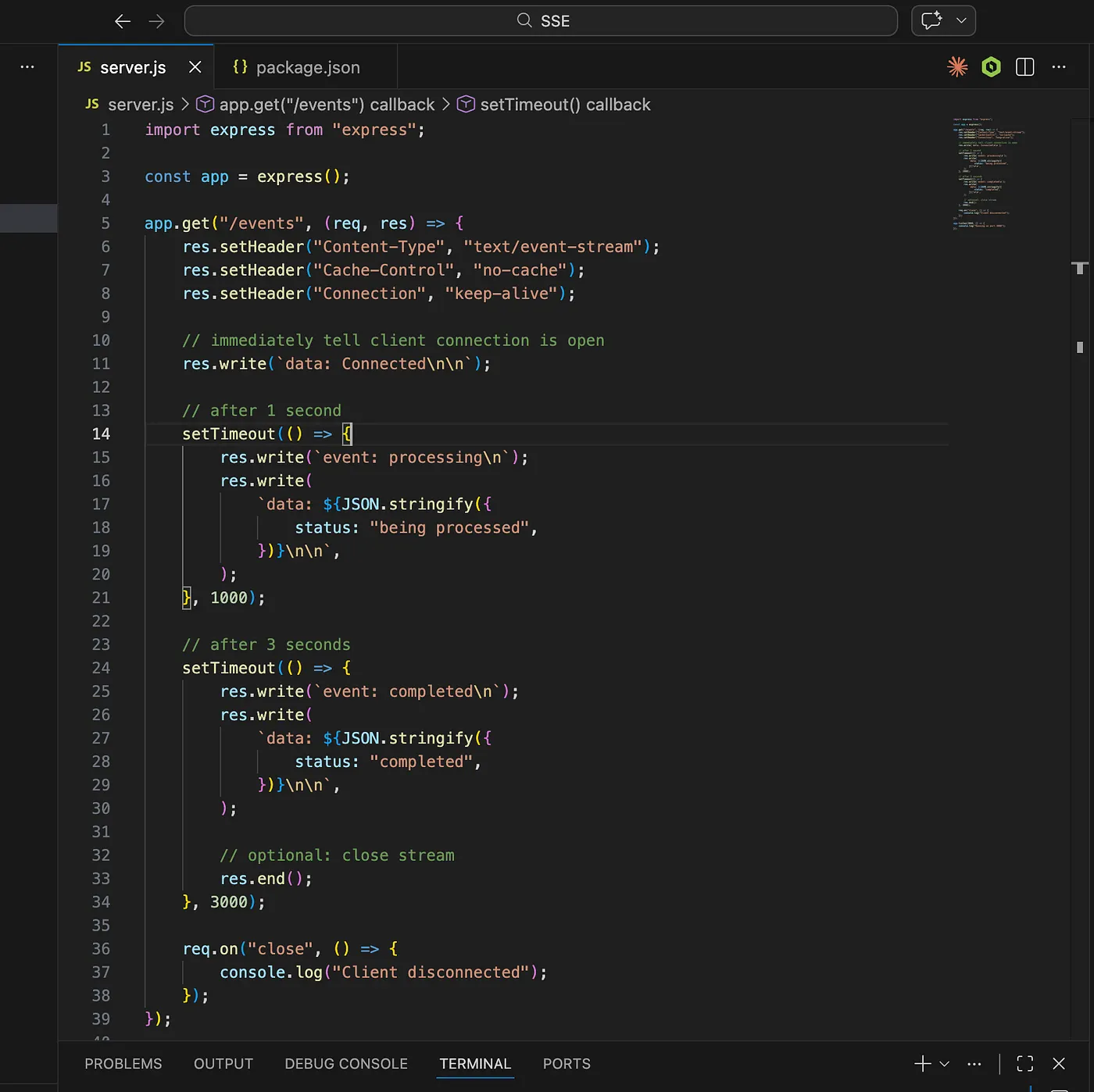
The key idea is that the HTTP response remains open. The server writes events to that response whenever new information becomes available.
import express from "express";

const app = express();

app.get("/events", (req, res) => {
    res.setHeader("Content-Type", "text/event-stream");
    res.setHeader("Cache-Control", "no-cache, no-transform");
    res.setHeader("Connection", "keep-alive");
    res.flushHeaders();

    res.write(
        `event: connected\ndata: ${JSON.stringify({
            status: "connected",
        })}\n\n`,
    );

    const processingTimer = setTimeout(() => {
        res.write(
            `event: processing\ndata: ${JSON.stringify({
                status: "being processed",
            })}\n\n`,
        );
    }, 1000);

    const completedTimer = setTimeout(() => {
        res.write(
            `event: completed\ndata: ${JSON.stringify({
                status: "completed",
            })}\n\n`,
        );

        res.end();
    }, 3000);

    req.on("close", () => {
        clearTimeout(processingTimer);
        clearTimeout(completedTimer);
    });
});

app.listen(3000);
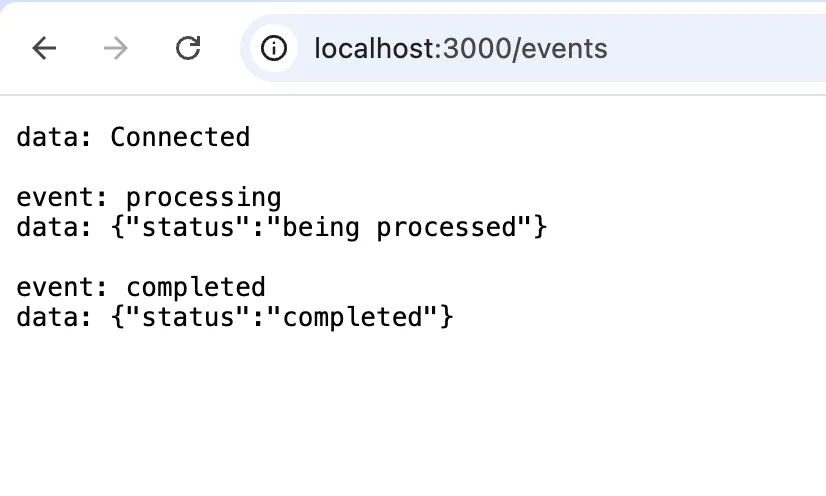
Each SSE message contains an optional event name and a data payload, followed by a blank line:
event: completed
data: {"status":"completed"}
The streamed response looks like this:
Receiving events in Angular
The browser opens the connection using EventSource:
const events = new EventSource(`/api/batches/${batchId}/events`);

events.addEventListener("processing", (event) => {
    const update = JSON.parse((event as MessageEvent).data);
    console.log(update.status);
});

events.addEventListener("completed", (event) => {
    const update = JSON.parse((event as MessageEvent).data);
    console.log(update.status);

    events.close();
});
In the full architecture, the endpoint would keep the connection associated with the requested batch. When the API server receives a BATCH_COMPLETED event from Redis Pub/Sub, it writes the update to the matching SSE connections.
For production use, the endpoint should also clean up disconnected clients, send occasional heartbeat comments, and ensure that reverse proxies do not buffer the response.
A familiar use of SSE
OpenAI's Responses API also supports server-sent streaming events. When streaming is enabled, generated output can be delivered incrementally instead of waiting for the complete response.
That streaming model enables interfaces to render text as it is generated, producing the familiar typewriter-style experience.
You can read more in the OpenAI streaming events documentation.
Conclusion
Queues and worker pools solve the background-processing problem, but the frontend still needs an efficient way to learn when the work has completed.
In this architecture:
Queue → Worker pool → Database → Redis Pub/Sub → Node.js API → SSE clientThe queue allows image processing to scale independently. Redis Pub/Sub decouples workers from the API server. SSE provides a lightweight, one-way real-time channel from the backend to the browser.
Use SSE when the server needs to push progress, status, or completion events to a browser and the client does not need a bidirectional connection.